HTTP 支持
HTTP 支持
Spring Integration 的 HTTP 支持允许运行 HTTP 请求并处理传入的 HTTP 请求。
HTTP 支持包含以下网关实现:HttpInboundEndpoint 和 HttpRequestExecutingMessageHandler。
另请参阅 WebFlux 支持。
您需要将以下依赖项包含到您的项目中:
<dependency>
    <groupId>org.springframework.integration</groupId>
    <artifactId>spring-integration-http</artifactId>
    <version>6.1.9</version>
</dependency>compile "org.springframework.integration:spring-integration-http:6.1.9"
目标 Servlet 容器必须提供 jakarta.servlet:jakarta.servlet-api 依赖项。
HTTP 入站组件
要通过 HTTP 接收消息,您需要使用 HTTP 入站通道适配器或 HTTP 入站网关。
为了支持这些 HTTP 入站适配器,它们需要部署在 Servlet 容器中,例如 Apache Tomcat 或 Jetty。
最简单的方法是使用 Spring 的 HttpRequestHandlerServlet,只需在 web.xml 文件中提供以下 servlet 定义即可:
<servlet>
    <servlet-name>inboundGateway</servlet-name>
    <servlet-class>o.s.web.context.support.HttpRequestHandlerServlet</servlet-class>
</servlet>
请注意,servlet 名称与 bean 名称相匹配。
有关使用 HttpRequestHandlerServlet 的更多信息,请参阅 使用 Spring 进行远程处理和 Web 服务,该文档是 Spring Framework 参考文档的一部分。
如果您在 Spring MVC 应用程序中运行,则上述显式的 servlet 定义是不必要的。 在这种情况下,您的网关的 bean 名称可以像 Spring MVC Controller bean 那样与 URL 路径进行匹配。 更多信息,请参阅 Web MVC 框架,它是 Spring Framework 参考文档的一部分。
| 对于示例应用程序和相应的配置,请参阅 Spring Integration 示例 仓库。 其中包含 HTTP 示例 应用程序,该应用程序演示了 Spring Integration 的 HTTP 支持。 |
以下示例 bean 定义了一个 HTTP 入站端点:
<bean id="httpInbound"
  class="org.springframework.integration.http.inbound.HttpRequestHandlingMessagingGateway">
  <property name="requestChannel" ref="httpRequestChannel" />
  <property name="replyChannel" ref="httpReplyChannel" />
</bean>
HttpRequestHandlingMessagingGateway 接受一个 HttpMessageConverter 实例列表,否则依赖默认列表。
转换器允许自定义从 HttpServletRequest 到 Message 的映射。
默认转换器封装了简单的策略,例如为内容类型以 text 开头的 POST 请求创建一个 String 消息。
有关完整详细信息,请参阅 Javadoc。
可以设置一个额外的标志 (mergeWithDefaultConverters),与自定义 HttpMessageConverter 列表一起使用,以便在自定义转换器之后添加默认转换器。
默认情况下,此标志设置为 false,意味着自定义转换器将替换默认列表。
消息转换过程使用(可选的)requestPayloadType 属性和传入的 Content-Type 头信息。
从版本 4.3 开始,如果请求没有内容类型头,则默认假设为 application/octet-stream,这是 RFC 2616 所推荐的。
此前,此类消息的主体会被忽略。
Spring Integration 2.0 实现了多部分文件支持。
如果请求已被包装为 MultipartHttpServletRequest,当您使用默认转换器时,该请求会被转换为一个 Message 负载,它是一个 MultiValueMap,其中包含的值可能是字节数组、字符串或 Spring 的 MultipartFile 实例,具体取决于各个部分的 content type。
HTTP 入站端点会在上下文中定位一个 MultipartResolver,前提是该上下文存在一个名为 multipartResolver 的 Bean(这与 Spring 的 DispatcherServlet 所期望的名称相同)。
如果它成功定位到该 Bean,则会在入站请求映射器上启用对多部分文件的支持。
否则,当它尝试将多部分文件请求映射到 Spring Integration 的 Message 时将会失败。
有关 Spring 对 MultipartResolver 支持的更多信息,请参阅 Spring 参考手册。 |
|
如果您希望将 |
当您向客户端发送响应时,有多种方式可以自定义网关的行为。
默认情况下,网关通过返回 200 状态码来确认已收到请求。
可以通过提供由 Spring MVC ViewResolver 解析的'viewName'来自定义此响应。
如果网关应期望收到对 Message 的回复,您可以将 expectReply 标志(构造函数参数)设置为使网关在创建 HTTP 响应之前等待回复 Message。
以下示例配置了一个网关,使其作为具有视图名称的 Spring MVC 控制器:
<bean id="httpInbound"
  class="org.springframework.integration.http.inbound.HttpRequestHandlingController">
  <constructor-arg value="true" /> <!-- indicates that a reply is expected -->
  <property name="requestChannel" ref="httpRequestChannel" />
  <property name="replyChannel" ref="httpReplyChannel" />
  <property name="viewName" value="jsonView" />
  <property name="supportedMethodNames" >
    <list>
      <value>GET</value>
      <value>DELETE</value>
    </list>
  </property>
</bean>
由于 constructor-arg 的值为 true,因此它会等待回复。
前面的示例还展示了如何自定义网关接受的 HTTP 方法,默认情况下它们是 POST 和 GET。
回复消息可在模型映射中获取。 默认情况下,该映射条目的键为'reply',但你可以通过设置端点配置上的'replyKey'属性来覆盖此默认值。
负载验证
从 5.2 版本开始,HTTP 入站端点可以提供一个 Validator 来在将有效负载发送到通道之前进行检查。
该有效负载已经是转换和提取后的结果,之后使用 payloadExpression 来缩小与有价值数据相关的验证范围。
验证失败的处理方式与 Spring MVC 中的错误处理完全相同。
HTTP 出站组件
本节介绍 Spring Integration 的 HTTP 出站组件。
使用HttpRequestExecutingMessageHandler
要配置HttpRequestExecutingMessageHandler,请编写如下所示的 Bean 定义:
<bean id="httpOutbound"
  class="org.springframework.integration.http.outbound.HttpRequestExecutingMessageHandler">
  <constructor-arg value="http://localhost:8080/example" />
  <property name="outputChannel" ref="responseChannel" />
</bean>
此 Bean 定义通过将 HTTP 请求委托给 RestTemplate 来运行。
该模板随后将请求委托给一系列 HttpMessageConverter 实例,以从 Message 有效负载生成 HTTP 请求体。
正如以下示例所示,您也可以配置这些转换器以及要使用的 ClientHttpRequestFactory 实例:
<bean id="httpOutbound"
  class="org.springframework.integration.http.outbound.HttpRequestExecutingMessageHandler">
  <constructor-arg value="http://localhost:8080/example" />
  <property name="outputChannel" ref="responseChannel" />
  <property name="messageConverters" ref="messageConverterList" />
  <property name="requestFactory" ref="customRequestFactory" />
</bean>
默认情况下,HTTP 请求是使用 SimpleClientHttpRequestFactory 的实例生成的,该实例使用 JDK HttpURLConnection。
也可以通过 CommonsClientHttpRequestFactory 支持使用 Apache Commons HTTP Client,您可以像之前所示那样注入它。
| 对于出站网关,网关生成的回复消息包含请求消息中存在的所有消息头。 |
使用 Cookie
基本的 Cookie 支持由出站网关上的 transfer-cookies 属性提供。
当设置为 true(默认为 false)时,从服务器在响应中接收到的 Set-Cookie 头将被转换为回复消息中的 Cookie。
随后,该头将在后续发送中使用。
这实现了简单的有状态交互,如下所示:
…→logonGateway→…→doWorkGateway→…→logoffGateway→…
如果 transfer-cookies 是 false,则任何接收到的 Set-Cookie 标头在回复消息中保持为 Set-Cookie,并在后续发送时被丢弃。
|
空响应体
HTTP 是一种请求 - 响应协议。
然而,响应可能没有主体(body),仅包含头部(headers)。
在这种情况下, |
|
expected-response-type
关于前面提到的空响应体,如果响应确实包含一个体,则必须提供适当的 |
从版本 5.5 开始,HttpRequestExecutingMessageHandler 暴露了一个 extractResponseBody 标志(默认为 true),用于仅返回响应体,或无论提供的 expectedResponseType 如何,都返回整个 ResponseEntity 作为回复消息负载。
如果 ResponseEntity 中不存在响应体,则忽略此标志并返回整个 ResponseEntity。
HTTP 命名空间支持
Spring Integration 提供了一个http命名空间及相应的架构定义。
要在配置中包含它,请在您的应用程序上下文配置文件中提供以下命名空间声明:
<?xml version="1.0" encoding="UTF-8"?>
<beans xmlns="http://www.springframework.org/schema/beans"
  xmlns:xsi="http://www.w3.org/2001/XMLSchema-instance"
  xmlns:int="http://www.springframework.org/schema/integration"
  xmlns:int-http="http://www.springframework.org/schema/integration/http"
  xsi:schemaLocation="
    http://www.springframework.org/schema/beans
    https://www.springframework.org/schema/beans/spring-beans.xsd
    http://www.springframework.org/schema/integration
    https://www.springframework.org/schema/integration/spring-integration.xsd
    http://www.springframework.org/schema/integration/http
    https://www.springframework.org/schema/integration/http/spring-integration-http.xsd">
    ...
</beans>
传入
XML 命名空间提供了两个用于处理 HTTP 入站请求的组件:inbound-channel-adapter 和 inbound-gateway。
若要处理请求而不返回专用响应,请使用 inbound-channel-adapter。
以下示例展示了如何配置其中一个:
<int-http:inbound-channel-adapter id="httpChannelAdapter" channel="requests"
supported-methods="PUT, DELETE"/>对于需要响应的请求,请使用inbound-gateway。
以下示例展示了如何配置一个:
<int-http:inbound-gateway id="inboundGateway"
    request-channel="requests"
    reply-channel="responses"/>
请求映射支持
Spring Integration 3.0 通过引入 IntegrationRequestMappingHandlerMapping 改进了 REST 支持。
该实现依赖于 Spring Framework 3.1 或更高版本提供的增强型 REST 支持。 |
HTTP 入站网关或 HTTP 入站通道适配器的解析过程会注册一个类型为 IntegrationRequestMappingHandlerMapping 的 integrationRequestMappingHandlerMapping Bean(如果尚未注册的话)。
该 HandlerMapping 的具体实现将其逻辑委托给 RequestMappingInfoHandlerMapping。
此实现提供的功能类似于 Spring MVC 中的 org.springframework.web.bind.annotation.RequestMapping 注解。
有关更多信息,请参阅使用@RequestMapping映射请求。 |
为此目的,Spring Integration 3.0 引入了 <request-mapping> 元素。
您可以将此可选元素添加到 <http:inbound-channel-adapter> 和 <http:inbound-gateway> 中。
它与 path 和 supported-methods 属性协同工作。
以下示例展示了如何在入站网关上配置它:
<inbound-gateway id="inboundController"
    request-channel="requests"
    reply-channel="responses"
    path="/foo/{fooId}"
    supported-methods="GET"
    view-name="foo"
    error-code="oops">
   <request-mapping headers="User-Agent"
     params="myParam=myValue"
     consumes="application/json"
     produces="!text/plain"/>
</inbound-gateway>
基于上述配置,命名空间解析器会创建一个 IntegrationRequestMappingHandlerMapping 的实例(如果尚不存在)以及一个 HttpRequestHandlingController Bean,并将其与 RequestMapping 的实例关联。
该 RequestMapping 实例随后被转换为 Spring MVC 的 RequestMappingInfo。
The <request-mapping> 元素提供以下属性:
-
headers -
params -
consumes -
produces
使用 path 和 supported-methods 属性,或者 <http:inbound-channel-adapter> 或 <http:inbound-gateway> 的 <request-mapping> 属性,会直接映射为 Spring MVC 中 org.springframework.web.bind.annotation.RequestMapping 注解所提供的相应选项。
The <request-mapping> 元素允许您将多个 Spring Integration HTTP 入站端点配置到同一个 path(甚至同一个 supported-methods),并根据传入的 HTTP 请求提供不同的下游消息流。
另外,您也可以只声明一个 HTTP 入站端点,并在 Spring Integration 流程中应用路由和过滤逻辑以实现相同的结果。
这使得您可以尽早将 Message 引入流程。
以下示例展示了如何实现:
<int-http:inbound-gateway request-channel="httpMethodRouter"
    supported-methods="GET,DELETE"
    path="/process/{entId}"
    payload-expression="#pathVariables.entId"/>

<int:router input-channel="httpMethodRouter" expression="headers.http_requestMethod">
    <int:mapping value="GET" channel="in1"/>
    <int:mapping value="DELETE" channel="in2"/>
</int:router>

<int:service-activator input-channel="in1" ref="service" method="getEntity"/>

<int:service-activator input-channel="in2" ref="service" method="delete"/>
有关处理器映射的更多信息,请参阅 Spring Framework Web Servlet 文档 或 Spring Framework Web Reactive 文档。
The IntegrationRequestMappingHandlerMapping extends the Spring MVC RequestMappingHandlerMapping class, inheriting most of its logic, especially handleNoMatch(Set, String, HttpServletRequest), which throws a specific 4xx error for the HTTP response, when mapping doesn't match for some reason, preventing calls to any remaining mapping handlers in the application context.
For this reason, configuring the same path for both Spring Integration and Spring MVC request mappings (e.g. POST in one and GET in the other) is not supported; the MVC mapping will not be found.. |
跨源资源共享 (CORS) 支持
从 4.2 版本开始,您可以使用 <http:inbound-channel-adapter> 元素来配置 <http:inbound-gateway> 和 <cross-origin>。
它与 Spring MVC 中用于 @CrossOrigin 注解的 @Controller 选项相同,并允许为 Spring Integration HTTP 端点配置跨域资源共享 (CORS):
-
origin: 允许的源列表。*表示允许所有源。 这些值将放置在预检请求和实际响应的Access-Control-Allow-Origin响应头中。 默认值为*。 -
allowed-headers: 指示在实际请求期间可以使用哪些请求头。*表示允许客户端请求的所有头信息。 此属性控制预检响应中的Access-Control-Allow-Headers头的值。 默认值为*。 -
exposed-headers: 用户代理允许客户端访问的响应头列表。 此属性控制实际响应的Access-Control-Expose-Headers头的值。 -
method: 允许的 HTTP 请求方法:GET,POST,HEAD,OPTIONS,PUT,PATCH,DELETE,TRACE。 此处指定的方法将覆盖supported-methods中的设置。 -
allow-credentials: 如果浏览器应包含与请求域关联的任何 Cookie,则设置为true;如果不应包含,则设置为false。 空字符串 ("") 表示未定义。 如果为true,预检响应将包含Access-Control-Allow-Credentials=true头。 默认值为true。 -
max-age: 控制预检响应(pre-flight responses)的缓存时长。 将此值设置为合理的数值可以减少浏览器所需的预检请求 - 响应交互次数。 此属性控制预检响应中Access-Control-Max-Age头的值。 值为-1表示未定义。 默认值为 1800 秒(30 分钟)。
CORS Java 配置由 org.springframework.integration.http.inbound.CrossOrigin 类表示,该类实例可注入到 HttpRequestHandlingEndpointSupport Bean 中。
响应状态码
从版本 4.1 开始,您可以使用 <http:inbound-channel-adapter> 配置一个 status-code-expression 来覆盖默认的 200 OK 状态。
该表达式必须返回一个可以转换为 org.springframework.http.HttpStatus 枚举值的对象。
evaluationContext 拥有一个 BeanResolver,并且从版本 5.1 开始,它会将 RequestEntity<?> 作为根对象提供。
一个示例可能是在运行时解析某个作用域的 Bean,该 Bean 返回一个状态码值。
然而,更常见的情况是将其设置为固定值,例如 status-code=expression="204"(无内容),或 status-code-expression="T(org.springframework.http.HttpStatus).NO_CONTENT"。
默认情况下,status-code-expression 为 null,这意味着将返回正常的 '200 OK' 响应状态。
使用 RequestEntity<?> 作为根对象时,状态码可以是条件性的,例如基于请求方法、某些头部、URI 内容甚至请求体。
以下示例展示了如何将状态码设置为 ACCEPTED:
<http:inbound-channel-adapter id="inboundController"
       channel="requests" view-name="foo" error-code="oops"
       status-code-expression="T(org.springframework.http.HttpStatus).ACCEPTED">
   <request-mapping headers="BAR"/>
</http:inbound-channel-adapter>
<http:inbound-gateway> 用于从回复 Message 的 http_statusCode 头信息中解析“状态码”。
自版本 4.2 起,如果在 reply-timeout 时间内未收到回复,默认响应状态码为 500 Internal Server Error。
修改此行为有两种方式:
-
添加一个
reply-timeout-status-code-expression。 这与入站适配器上的status-code-expression具有相同的语义。 -
添加一个
error-channel并返回一条合适的消息,包含 HTTP 状态Jetty,如下例所示:<int:chain input-channel="errors"> <int:header-enricher> <int:header name="http_statusCode" value="504" /> </int:header-enricher> <int:transformer expression="payload.failedMessage" /> </int:chain>
ErrorMessage 的负载是一个 MessageTimeoutException。
它必须被转换为网关可以转换的内容,例如 String。
一个很好的候选者是异常的消息属性,这是在使用 expression 技术时使用的值。
如果错误流在主流程超时后超时,则返回 500 Internal Server Error;或者,如果存在 reply-timeout-status-code-expression,则对其进行评估。
此前,超时的默认状态码为 200 OK。
若要恢复该行为,请设置为 reply-timeout-status-code-expression="200"。 |
从版本 5.4 开始,在准备请求消息时遇到的错误会被发送到错误通道(如果已提供)。
是否抛出适当的异常应在错误流中通过检查异常来决定。
此前,任何异常都会被直接抛出,导致 HTTP 500 服务器错误响应状态;但在某些情况下,问题可能是由不正确的请求参数引起的,因此应抛出带有 4xx 客户端错误状态的 ResponseStatusException。
有关更多信息,请参阅 ResponseStatusException。
发送到该错误通道的 ErrorMessage 将原始异常作为负载(payload)包含在内,以便进行分析。
==== URI 模板变量与表达式
通过结合使用 path 属性、payload-expression 属性以及 header 元素,您可以获得高度的灵活性来映射传入的请求数据。
在以下示例配置中,入站通道适配器已配置为使用以下 URI 接受请求:
/first-name/{firstName}/last-name/{lastName}当您使用 payload-expression 属性时,{firstName} URI 模板变量将映射为 Message 负载(payload),而 {lastName} URI 模板变量将映射为 lname 消息头,如下例所示:
<int-http:inbound-channel-adapter id="inboundAdapterWithExpressions"
    path="/first-name/{firstName}/last-name/{lastName}"
    channel="requests"
    payload-expression="#pathVariables.firstName">
    <int-http:header name="lname" expression="#pathVariables.lastName"/>
</int-http:inbound-channel-adapter>
有关 URI 模板变量的更多信息,请参阅 Spring 参考手册中的URI 模板模式。
自 Spring Integration 3.0 起,除了 payload 和 header 表达式中可用的现有 #pathVariables 和 #requestParams 变量外,我们还添加了其他有用的表达式变量:
-
#requestParams: 来自ServletRequestparameterMap的MultiValueMap。 -
#pathVariables: 来自 URI 模板占位符及其值的Map。 -
#matrixVariables: Spring MVC 规范中MultiValueMap的Map。 请注意,#matrixVariables需要Spring MVC 3.2或更高版本。 -
#requestAttributes: 与当前请求关联的org.springframework.web.context.request.RequestAttributes。 -
#requestHeaders: 当前请求中的org.springframework.http.HttpHeaders对象。 -
#cookies:MultiValueMap<String, Cookie>个来自当前请求的实例的jakarta.servlet.http.Cookie。
请注意,所有这些值(以及其他值)都可以在下游消息流中的表达式中通过ThreadLocalorg.springframework.web.context.request.RequestAttributes变量访问,前提是该消息流是单线程的且位于请求线程内。
以下示例配置了一个使用expression属性的转换器:
<int-:transformer
    expression="T(org.springframework.web.context.request.RequestContextHolder).
                  requestAttributes.request.queryString"/>
出站
要配置出站网关,您可以使用命名空间支持。 以下代码片段显示了出站 HTTP 网关的可用配置选项:
<int-http:outbound-gateway id="example"
    request-channel="requests"
    url="http://localhost/test"
    http-method="POST"
    extract-request-payload="false"
    expected-response-type="java.lang.String"
    charset="UTF-8"
    request-factory="requestFactory"
    reply-timeout="1234"
    reply-channel="replies"/>
最重要的是,请注意已提供了'http-method'和'expected-response-type'属性。
这两个是最常配置的值。
默认http-method为POST,默认响应类型为null。
当响应类型为null时,回复的负载Message包含ResponseEntity,只要其HTTP状态码表示成功(非成功状态码将抛出异常)。
如果您期望不同的类型,例如一个String,请将其作为完全限定类名提供(如前面示例中的java.lang.String)。
另请参阅关于空响应体的说明,位于HTTP出站组件中。
自 Spring Integration 2.1 版本起,HTTP 出站网关的 request-timeout 属性已重命名为 reply-timeout,以更准确地反映其意图。 |
|
自 Spring Integration 2.2 版本起,HTTP 上的 Java 序列化默认不再启用。
此前,当将 然而,由于这可能导致与现有应用程序不兼容,因此决定不再自动将此转换器添加到 HTTP 端点。
如果您希望使用 Java 序列化,可以通过使用 |
从 Spring Integration 2.2 开始,您还可以使用 SpEL 和 http-method-expression 属性动态确定 HTTP 方法。
请注意,此属性与 http-method 互斥。
您也可以使用 expected-response-type-expression 属性替代 expected-response-type,并提供任何有效的 SpEL 表达式以确定响应类型。
以下配置示例使用了 expected-response-type-expression:
<int-http:outbound-gateway id="example"
    request-channel="requests"
    url="http://localhost/test"
    http-method-expression="headers.httpMethod"
    extract-request-payload="false"
    expected-response-type-expression="payload"
    charset="UTF-8"
    request-factory="requestFactory"
    reply-timeout="1234"
    reply-channel="replies"/>
如果您的出站适配器以单向方式使用,您可以使用 outbound-channel-adapter。
这意味着成功的响应将执行而不向回复通道发送任何消息。
对于任何非成功响应状态码,它将抛出异常。
其配置与网关非常相似,如下例所示:
<int-http:outbound-channel-adapter id="example"
    url="http://localhost/example"
    http-method="GET"
    channel="requests"
    charset="UTF-8"
    extract-payload="false"
    expected-response-type="java.lang.String"
    request-factory="someRequestFactory"
    order="3"
auto-startup="false"/>|
要指定 URL,您可以使用 'url' 属性或 'url-expression' 属性。
'url' 属性接受一个简单的字符串(包含 URI 变量的占位符,如下文所述)。
'url-expression' 是一个 SpEL 表达式,其中 在之前的版本中,一些用户使用占位符来用 URI 变量替换整个 URL。 Spring 3.1 中的更改可能会导致转义字符(例如 '?')出现问题。 因此,我们建议,如果您希望在运行时完全生成 URL,请使用 'url-expression' 属性。 |
映射 URI 变量
如果您的 URL 包含 URI 变量,您可以使用 uri-variable 元素对其进行映射。
该元素适用于 HTTP 出站网关和 HTTP 出站通道适配器。
以下示例将 zipCode URI 变量映射到一个表达式:
<int-http:outbound-gateway id="trafficGateway"
url="https://local.yahooapis.com/trafficData?appid=YdnDemo&zip={zipCode}"
request-channel="trafficChannel"
http-method="GET"
expected-response-type="java.lang.String">
<int-http:uri-variable name="zipCode" expression="payload.getZip()"/>
</int-http:outbound-gateway>uri-variable元素定义了两个属性:name和expression。
name属性用于标识URI变量的名称,而expression属性则用于设置实际值。
通过使用expression属性,您可以充分利用Spring表达式语言(SpEL)的强大功能,从而完全动态地访问消息负载和消息头。
例如,在前面的配置中,将在Message的消息负载对象上调用getZip()方法,并将该方法的返回值用作名为'zipCode'的URI变量的值。
自 Spring Integration 3.0 起,HTTP 出站端点支持 uri-variables-expression 属性,用于指定一个应被求值的 expression,从而对 URL 模板中的所有 URI 变量占位符进行替换。Map。
它提供了一种机制,使您能够根据出站消息使用不同的变量表达式。
此属性与 <uri-variable/> 元素互斥。
以下示例展示了如何使用 uri-variables-expression 属性:
<int-http:outbound-gateway
     url="https://foo.host/{foo}/bars/{bar}"
     request-channel="trafficChannel"
     http-method="GET"
     uri-variables-expression="@uriVariablesBean.populate(payload)"
     expected-response-type="java.lang.String"/>
uriVariablesBean 可定义如下:
public class UriVariablesBean {
    private static final ExpressionParser EXPRESSION_PARSER = new SpelExpressionParser();

    public Map<String, ?> populate(Object payload) {
        Map<String, Object> variables = new HashMap<String, Object>();
        if (payload instanceOf String.class)) {
            variables.put("foo", "foo"));
        }
        else {
            variables.put("foo", EXPRESSION_PARSER.parseExpression("headers.bar"));
        }
        return variables;
    }

}
The uri-variables-expression must evaluate to a Map.
The values of the Map must be instances of String or Expression.
This Map is provided to an ExpressionEvalMap for further resolution of URI variable placeholders by using those expressions in the context of the outbound Message. |
重要
uriVariablesExpression属性提供了一种非常强大的机制用于评估URI变量。
我们预期人们主要会使用简单的表达式,如前面的示例所示。
然而,您也可以配置类似"@uriVariablesBean.populate(#root)"的内容,其中返回的映射中的表达式为variables.put("thing1", EXPRESSION_PARSER.parseExpression(message.getHeaders().get("thing2", String.class)));,该表达式动态地来自名为thing2的消息头中。
由于消息头可能来自不可信的来源,HTTP出站端点在评估这些表达式时会使用SimpleEvaluationContext。
SimpleEvaluationContext仅使用了SpEL功能的一个子集。
如果您信任您的消息源并希望使用受限的SpEL构造,请将出站端点的trustedSpel属性设置为true。
您可以通过使用自定义 url-expression 以及用于构建和编码 URL 参数的实用工具,实现为每条消息动态提供一组 URI 变量的场景。
以下示例展示了如何实现:
url-expression="T(org.springframework.web.util.UriComponentsBuilder)
                           .fromHttpUrl('https://HOST:PORT/PATH')
                           .queryParams(payload)
                           .build()
                           .toUri()"
The queryParams() 方法期望一个 MultiValueMap<String, String> 作为参数,因此您可以在执行请求之前提前构建一套真实的 URL 查询参数。
整个 queryString 也可以表示为 uri-variable,如下例所示:
<int-http:outbound-gateway id="proxyGateway" request-channel="testChannel"
url="http://testServer/test?{queryString}">
<int-http:uri-variable name="queryString" expression="'a=A&b=B'"/>
</int-http:outbound-gateway>在这种情况下,您必须手动提供 URL 编码。
例如,您可以使用 org.apache.http.client.utils.URLEncodedUtils#format() 来实现这一目的。
如前所述,一个手动构建的 MultiValueMap<String, String> 可以通过以下 Java Streams 代码片段转换为 List<NameValuePair> format() 方法参数:
List<NameValuePair> nameValuePairs =
    params.entrySet()
            .stream()
            .flatMap(e -> e
                    .getValue()
                    .stream()
                    .map(v -> new BasicNameValuePair(e.getKey(), v)))
            .collect(Collectors.toList());
控制 URI 编码
默认情况下,URL 字符串在发送请求前会被编码为 URI 对象(参见 UriComponentsBuilder)。
在某些涉及非标准 URI 的场景中(例如 RabbitMQ REST API),不希望执行编码操作。
<http:outbound-gateway/> 和 <http:outbound-channel-adapter/> 提供了一个 encoding-mode 属性。
要禁用 URL 编码,请将此属性设置为 NONE(默认值为 TEMPLATE_AND_VALUES)。
如果您希望仅对 URL 的某一部分进行部分编码,可在 <uri-variable/> 中使用 expression,如下例所示:
<http:outbound-gateway url="https://somehost/%2f/fooApps?bar={param}" encoding-mode="NONE">
          <http:uri-variable name="param"
            expression="T(org.apache.commons.httpclient.util.URIUtil)
                                             .encodeWithinQuery('Hello World!')"/>
</http:outbound-gateway>
使用 Java DSL,此选项可以通过 BaseHttpMessageHandlerSpec.encodingMode() 选项进行控制。
相同的配置同样适用于 WebFlux 模块 和 Web Services 模块 中的类似出站组件。
对于更复杂的场景,建议在外部提供的 RestTemplate 上配置一个 UriTemplateHandler;或者在 WebFlux 的情况下,使用 WebClient 及其 UriBuilderFactory。
使用 Java 配置 HTTP 端点
以下示例展示了如何使用 Java 配置入站网关:
@Bean
public HttpRequestHandlingMessagingGateway inbound() {
    HttpRequestHandlingMessagingGateway gateway =
        new HttpRequestHandlingMessagingGateway(true);
    gateway.setRequestMapping(mapping());
    gateway.setRequestPayloadType(String.class);
    gateway.setRequestChannelName("httpRequest");
    return gateway;
}

@Bean
public RequestMapping mapping() {
    RequestMapping requestMapping = new RequestMapping();
    requestMapping.setPathPatterns("/foo");
    requestMapping.setMethods(HttpMethod.POST);
    return requestMapping;
}
以下示例展示了如何使用 Java DSL 配置入站网关:
@Bean
public IntegrationFlow inbound() {
    return IntegrationFlow.from(Http.inboundGateway("/foo")
            .requestMapping(m -> m.methods(HttpMethod.POST))
            .requestPayloadType(String.class))
        .channel("httpRequest")
        .get();
}
以下示例展示了如何使用 Java 配置出站网关:
@ServiceActivator(inputChannel = "httpOutRequest")
@Bean
public HttpRequestExecutingMessageHandler outbound() {
    HttpRequestExecutingMessageHandler handler =
        new HttpRequestExecutingMessageHandler("http://localhost:8080/foo");
    handler.setHttpMethod(HttpMethod.POST);
    handler.setExpectedResponseType(String.class);
    return handler;
}
以下示例展示了如何使用 Java DSL 配置出站网关:
@Bean
public IntegrationFlow outbound() {
    return IntegrationFlow.from("httpOutRequest")
        .handle(Http.outboundGateway("http://localhost:8080/foo")
            .httpMethod(HttpMethod.POST)
            .expectedResponseType(String.class))
        .get();
}
超时处理
在 HTTP 组件的上下文中,必须考虑两个时序区域:
-
与 Spring Integration 通道交互时的超时问题
-
与远程 HTTP 服务器交互时的超时问题
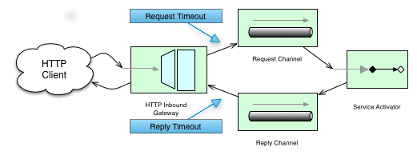
组件与消息通道交互,可以为这些通道指定超时时间。 例如,HTTP 入站网关将从连接的 HTTP 客户端接收到的消息转发到消息通道(该通道使用请求超时),随后从回复通道(该通道使用回复超时)接收回复消息,并用于生成 HTTP 响应。 以下图示提供了直观的说明:
对于出站端点,我们需要考虑在与远程服务器交互时的工作原理。下面的图片展示了此场景:
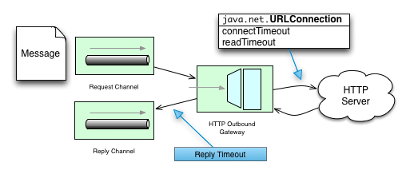
在通过 HTTP 出站网关或 HTTP 出站通道适配器进行主动 HTTP 请求时,您可能需要配置相关的 HTTP 超时行为。
在这些情况下,这两个组件将使用 Spring 的 RestTemplate 支持来执行 HTTP 请求。
要配置 HTTP 出站网关和 HTTP 出站通道适配器的超时时间,您可以直接引用一个 RestTemplate Bean(通过使用 rest-template 属性),或者您可以提供一个对 ClientHttpRequestFactory Bean 的引用(通过使用 request-factory 属性)。
Spring 提供了以下 ClientHttpRequestFactory 接口的实现:
-
SimpleClientHttpRequestFactory: 使用标准 J2SE 功能进行 HTTP 请求 -
HttpComponentsClientHttpRequestFactory: 使用 Apache HttpComponents HttpClient(自 Spring 3.1 起)
如果您未显式配置 request-factory 或 rest-template 属性,则会自动实例化一个默认的 RestTemplate(该默认值使用 SimpleClientHttpRequestFactory)。
|
在某些 JVM 实现中, 例如,来自 Java™ 平台标准版 6 API 规范中的 该方法的一些非标准实现可能会忽略指定的超时时间。
要查看设置的
如果您有特定需求,应测试您的超时设置。
考虑使用 |
| 当您使用 Apache HttpComponents HttpClient 并配合连接池管理器时,您应当了解:默认情况下,该连接管理器为每个给定路由最多创建两个并发连接,且总连接数不超过 20 个。 对于许多实际应用场景而言,这些限制可能过于严格。 有关如何配置这一重要组件的详细信息,请参阅 Apache 官方文档。 |
以下示例配置了一个 HTTP 出站网关,该网关使用一个 SimpleClientHttpRequestFactory 进行配置,其连接超时和读取超时分别设置为 5 秒:
<int-http:outbound-gateway url="https://samples.openweathermap.org/data/2.5/weather?q={city}"
                           http-method="GET"
                           expected-response-type="java.lang.String"
                           request-factory="requestFactory"
                           request-channel="requestChannel"
                           reply-channel="replyChannel">
    <int-http:uri-variable name="city" expression="payload"/>
</int-http:outbound-gateway>

<bean id="requestFactory"
      class="org.springframework.http.client.SimpleClientHttpRequestFactory">
    <property name="connectTimeout" value="5000"/>
    <property name="readTimeout"    value="5000"/>
</bean>
HTTP 出站网关
对于HTTP 出站网关,XML Schema 仅定义了reply-timeout。
reply-timeout映射到org.springframework.integration.http.outbound.HttpRequestExecutingMessageHandler类的sendTimeout属性。
更准确地说,该属性被设置在扩展的AbstractReplyProducingMessageHandler类上,该类最终将属性设置在MessagingTemplate上。
sendTimeout 属性的默认值为 30 秒,并将应用于已连接的 MessageChannel。
这意味着,具体实现方式可能使 Message Channel 的 send 方法无限期阻塞。
此外,sendTimeout 属性仅在实际的 MessageChannel 实现具有阻塞式发送(例如'full'有界 QueueChannel)时使用。
HTTP 入站网关
对于 HTTP 入站网关,XML Schema 定义了 request-timeout 属性,用于在 HttpRequestHandlingMessagingGateway 类(扩展自 MessagingGatewaySupport 类)上设置 requestTimeout 属性。
您还可以使用 reply-timeout 属性来映射到同一类上的 replyTimeout 属性。
两个超时属性的默认值均为 1000ms(即一千毫秒或一秒)。
最终,request-timeout 属性用于设置 MessagingTemplate 实例上的 sendTimeout。
另一方面,replyTimeout 属性用于设置 MessagingTemplate 实例上的 receiveTimeout 属性。
| 要模拟连接超时,您可以连接到一个不可路由的 IP 地址,例如 10.255.255.10。 |
HTTP 代理配置
如果您位于代理服务器之后,需要为 HTTP 出站适配器或网关配置代理设置,您可以采用以下两种方法之一。 在大多数情况下,您可以依赖控制代理设置的标准 Java 系统属性。 否则,您可以显式地为 HTTP 客户端请求工厂实例配置一个 Spring Bean。
标准 Java 代理配置
您可以设置三个系统属性来配置 HTTP 协议处理器所使用的代理设置:
-
http.proxyHost: 代理服务器的主机名。 -
http.proxyPort: 端口号(默认为80)。 -
http.nonProxyHosts: 应直接访问(绕过代理)的主机列表。 这是一个由|分隔的模式列表。 这些模式可以以*开头或结尾,表示通配符。 任何匹配这些模式之一的主机将通过直接连接访问,而不是通过代理。
对于 HTTPS,以下属性可用:
-
https.proxyHost: 代理服务器的主机名。 -
https.proxyPort: 端口号,默认值为 80。
Spring 的SimpleClientHttpRequestFactory
如果您需要对代理配置有更明确的控制,可以使用 Spring 的SimpleClientHttpRequestFactory并配置其'proxy'属性,如下例所示:
<bean id="requestFactory"
    class="org.springframework.http.client.SimpleClientHttpRequestFactory">
    <property name="proxy">
        <bean id="proxy" class="java.net.Proxy">
            <constructor-arg>
                <util:constant static-field="java.net.Proxy.Type.HTTP"/>
            </constructor-arg>
            <constructor-arg>
                <bean class="java.net.InetSocketAddress">
                    <constructor-arg value="123.0.0.1"/>
                    <constructor-arg value="8080"/>
                </bean>
            </constructor-arg>
        </bean>
    </property>
</bean>
HTTP 头映射
Spring Integration 为 HTTP 请求和 HTTP 响应均提供了 HTTP 头映射支持。
默认情况下,所有标准的 HTTP 头 都会从消息映射到 HTTP 请求或响应头,无需进一步配置。
然而,如果您确实需要进一步的自定义,可以利用命名空间支持提供额外的配置。
您可以提供一个逗号分隔的头部名称列表,并可以使用包含 '*' 字符的简单模式作为通配符。
提供此类值将覆盖默认行为。
基本上,它假定您在那一点上拥有完全的控制权。
但是,如果您确实想要包含所有标准的 HTTP 头,可以使用快捷模式:HTTP_REQUEST_HEADERS 和 HTTP_RESPONSE_HEADERS。
以下清单展示了两个示例(第一个使用了通配符):
<int-http:outbound-gateway id="httpGateway"
    url="http://localhost/test2"
    mapped-request-headers="thing1, thing2"
    mapped-response-headers="X-*, HTTP_RESPONSE_HEADERS"
    channel="someChannel"/>

<int-http:outbound-channel-adapter id="httpAdapter"
    url="http://localhost/test2"
    mapped-request-headers="thing1, thing2, HTTP_REQUEST_HEADERS"
    channel="someChannel"/>
适配器和网关使用 DefaultHttpHeaderMapper,现在它提供了两个静态工厂方法用于入站和出站适配器,以便应用正确的方向(根据需要将 HTTP 请求和响应映射为进入或离开)。
如果您需要进一步的定制,您也可以独立配置一个DefaultHttpHeaderMapper,并通过header-mapper属性将其注入到适配器中。
在 5.0 版本之前,DefaultHttpHeaderMapper 是用户定义的非标准 HTTP 头部的默认前缀,其值为 X-。
5.0 版本将默认前缀更改为空字符串。
根据 RFC-6648,现在不再推荐使用此类前缀。
您仍可通过设置 DefaultHttpHeaderMapper.setUserDefinedHeaderPrefix() 属性来自定义此选项。
以下示例为 HTTP 网关配置了一个头部映射器:
<int-http:outbound-gateway id="httpGateway"
    url="http://localhost/test2"
    header-mapper="headerMapper"
    channel="someChannel"/>

<bean id="headerMapper" class="o.s.i.http.support.DefaultHttpHeaderMapper">
    <property name="inboundHeaderNames" value="thing1*, *thing2, thing3"/>
    <property name="outboundHeaderNames" value="a*b, d"/>
</bean>如果您需要执行DefaultHttpHeaderMapper不支持的操作,可以直接实现HeaderMapper策略接口并提供您实现的引用。
集成图控制器
从 4.3 版本开始,HTTP 模块提供了一个 @EnableIntegrationGraphController 配置类注解和一个 <int-http:graph-controller/> XML 元素,用于将 IntegrationGraphServer 暴露为 REST 服务。
有关更多信息,请参阅 集成图。
HTTP 示例
本节通过几个示例总结我们对 Spring Integration HTTP 支持的介绍。
Multipart HTTP 请求 — RestTemplate(客户端)和 Http Inbound Gateway(服务器端)
此示例展示了如何使用 Spring 的 RestTemplate 发送 multipart HTTP 请求,并通过 Spring Integration 的 HTTP 入站适配器接收它。
我们创建一个 MultiValueMap 并填充 multipart 数据。
RestTemplate 负责其余工作(此处并无双关语),将其转换为 MultipartHttpServletRequest。
该特定客户端发送一个包含公司名称和图片文件(公司徽标)的 multipart HTTP 请求。
以下代码列表展示了该示例:
RestTemplate template = new RestTemplate();
String uri = "http://localhost:8080/multipart-http/inboundAdapter.htm";
Resource s2logo =
   new ClassPathResource("org/springframework/samples/multipart/spring09_logo.png");
MultiValueMap map = new LinkedMultiValueMap();
map.add("company", "SpringSource");
map.add("company-logo", s2logo);
HttpHeaders headers = new HttpHeaders();
headers.setContentType(new MediaType("multipart", "form-data"));
HttpEntity request = new HttpEntity(map, headers);
ResponseEntity<?> httpResponse = template.exchange(uri, HttpMethod.POST, request, null);
这就是我们客户端所需的全部内容。
在服务器端,我们有以下配置:
<int-http:inbound-channel-adapter id="httpInboundAdapter"
    channel="receiveChannel"
    path="/inboundAdapter.htm"
    supported-methods="GET, POST"/>

<int:channel id="receiveChannel"/>

<int:service-activator input-channel="receiveChannel">
    <bean class="org.springframework.integration.samples.multipart.MultipartReceiver"/>
</int:service-activator>

<bean id="multipartResolver"
class="org.springframework.web.multipart.commons.CommonsMultipartResolver"/>'httpInboundAdapter'接收请求并将其转换为一个有效负载为LinkedMultiValueMap的Message。
随后我们在'multipartReceiver'服务激活器中解析它,如下例所示:
public void receive(LinkedMultiValueMap<String, Object> multipartRequest){
    System.out.println("### Successfully received multipart request ###");
    for (String elementName : multipartRequest.keySet()) {
        if (elementName.equals("company")){
            System.out.println("\t" + elementName + " - " +
                ((String[]) multipartRequest.getFirst("company"))[0]);
        }
        else if (elementName.equals("company-logo")){
            System.out.println("\t" + elementName + " - as UploadedMultipartFile: " +
                ((UploadedMultipartFile) multipartRequest
                    .getFirst("company-logo")).getOriginalFilename());
        }
    }
}
您应该看到以下输出:
### Successfully received multipart request ###
   company - SpringSource
   company-logo - as UploadedMultipartFile: spring09_logo.png